Pay-In
Pay-In Overview
The pay-in process allows you to accept fiat payments from your clients and convert them into cryptocurrency or fiat balances on your account. This feature ensures seamless transactions for your business needs.
Pay-In Processing Lifecycle
For a visual representation of the pay-in lifecycle, refer to the diagram below:
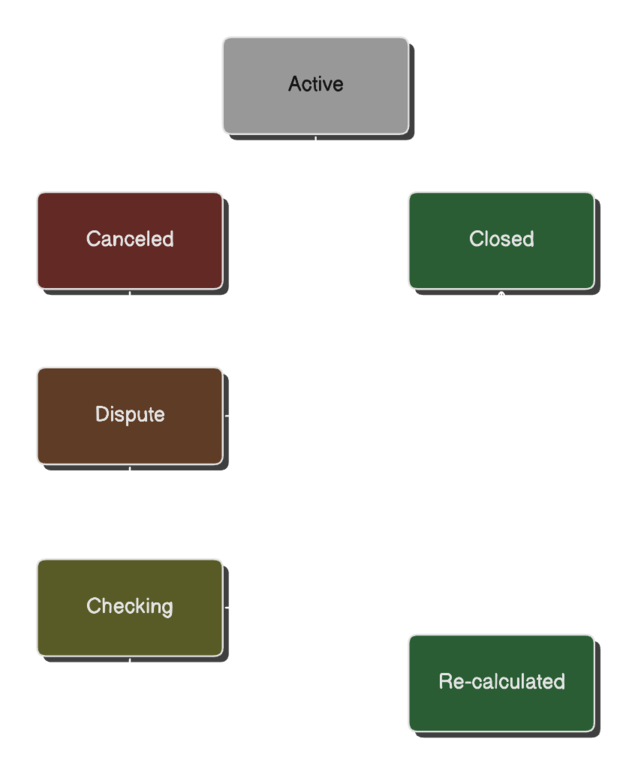
Pay-in Stages
The typical flow of a pay-in transaction involves the following stages:
-
active- The transaction has been created and is awaiting payment from the client.
- Once the client makes the payment, the system typically processes and closes the transaction automatically within seconds.
-
closed- The transaction has been successfully completed.
- Funds have been received from the client and credited to your account.
-
canceled- The transaction was canceled because the client failed to complete the payment within the allotted time frame.
- You can configure the payment window (time limit for payment) in your settings.
-
dispute- A dispute has been raised for the transaction, typically by providing a payment receipt.
- The transaction enters an appeal process handled by support specialists.
-
checking- The transaction is under review as part of the dispute process.
- This stage involves verification by one of the parties managing the payment details.
-
re_calculation- The transaction has successfully passed the dispute phase.
- The fiat amount has been recalculated and adjusted based on the actual payment details.
Initiate transaction
To initiate a pay-in transaction, use the [POST] /payment/trading/pay-in endpoint. During the request, you will specify either fiatAmount or fiatAmountRange. In response, you will immediately receive the cryptoAmount, payment requisite, currency rate, and the merchantFee for the transaction.
- Bank Selection:
- If you do not specify the
bankproperty when creating a transaction, the system will assign requisites from a randomly available bank. - If you specify the
bankproperty, requisites from the selected bank will be provided.
- If you do not specify the
You can retrieve the list of all available banks via the API endpoint: [GET] /payment/trading/banks.
Example Request:
POST /payment/trading/pay-in
Host: {{api-url}}
x-signature: d3b07384d113edec49eaa6238ad5ff00
Content-Type: application/json

{
  "fiatAmount": 5000,
  "fiatCurrency": "UAH",
  "method": "card",
  "extra": {
    "payerInfo": {
      "ip": "192.168.1.1",
      "userId": "65535",
      "userAgent": "Mozilla/5.0 (iPhone; CPU iPhone OS 16_6_1 like Mac OS X) AppleWebKit/655.1.15 (KHTML, like Gecko) Version/16.4 Mobile/148 Safari/04.1",
      "fingerprint": "fbb77b9f4265b18538e66cac5a37c6410dc2cdd7f0cddfde6eda25aa10df669b",
      "registeredAt": 1728388185326
    },
    "externalTransactionId": "txn_123456789"
  }
}
Example Response:
{
  "id": "43ba8793-66ad-482f-9e74-54381d3aea25",
  "fiatAmount": "5000.00",
  "cryptoAmount": "60835352",
  "merchantFee": "5171005",
  "currencyRate": "99.12",
  "type": "pay-in",
  "status": "active",
  "bank": "PRIVATBANK",
  "fiatCurrency": "UAH",
  "cryptoCurrency": "usdt",
  "cryptoNetwork": "trc20",
  "payoutInvoicesUrl": [],
  "disputeMerchantCheckUrl": null,
  "disputeTraderCheckUrl": null,
  "disputeMerchantFiatAmount": "0.00",
  "disputeTraderFiatAmount": "0.00",
  "requisite": {
    "id": "13edb294-2f1e-4679-a62a-ea12fdab1c9c",
    "bank": "PRIVATBANK",
    "ownerName": "Ivan Ivanov",
    "requisites": "5363542310297979",
    "fiatCurrency": "UAH"
  },
  "extra": {
    "payerInfo": {
      "ip": "192.168.1.1",
      "userId": "65535",
      "userAgent": "Mozilla/5.0 (iPhone; CPU iPhone OS 16_6_1 like Mac OS X) AppleWebKit/655.1.15 (KHTML, like Gecko) Version/16.4 Mobile/148 Safari/04.1",
      "fingerprint": "fbb77b9f4265b18538e66cac5a37c6410dc2cdd7f0cddfde6eda25aa10df669b",
      "registeredAt": 1728388185326
    },
    "externalTransactionId": "txn_123456789"
  },
  "createdAt": "2024-11-08T17:00:16.583Z"
}
Key Workflow Notes
Initial Status: Once a pay-in request is successfully created, its status will be active.
Payment Window: Each request has a payment window, configured in the settings. If payment is not completed within this window, the request will be automatically canceled, and you will receive a notification via your webhook.
Completed Payment: If the customer successfully completes the payment within the specified window, the transaction will automatically be marked as closed.
Handling High Volume and Requisites
For cases where a large number of pay-in requests are created with identical amounts, it is possible that requisites may temporarily be unavailable. To manage this, we recommend using fiatAmountRange instead of a fixed fiatAmount. This allows the system to select a suitable amount within the specified range, improving request fulfillment rates.
Optional Parameters
- Method: By default, if
methodis not specified, the system will randomly assign an available payment method. Available methods for this project:account,card,deeplink,link,phone_number,qr,quasi,mobile_comm. - Bank: If left unspecified, the platform will assign any available bank.
Payment Page URL Configuration
You can control where customers are redirected after payment and what support link is shown on the Payment Page by configuring the paymentPageConfig object in your pay-in request.
Default values (merchant settings)
In the Settings section of the merchant panel you can set default values for all transactions:
- Success URL (
successUrl) - the URL your customer is redirected to after a successful payment - Failure URL (
failureUrl) - the URL your customer is redirected to after a failed or cancelled payment - Support Link (
supportLink) - a link to your support channel (e.g. a Telegram chat) shown on the payment page
Per-request override
Pass paymentPageConfig in the pay-in request body to override the defaults for a specific transaction:
{
  "fiatAmount": 5000,
  "paymentPageConfig": {
    "success_redirect": "https://example.com/success",
    "error_redirect": "https://example.com/failed",
    "supportLink": "https://t.me/your_support",
    "locale": "EN"
  },
  "extra": { ... }
}
| Field | Type | Description |
|---|---|---|
success_redirect | string (optional) | Overrides the merchant default success redirect URL for this transaction. |
error_redirect | string (optional) | Overrides the merchant default failure redirect URL for this transaction. |
supportLink | string (optional) | Overrides the merchant default support link for this transaction. |
locale | string (optional) | Forces a specific language on the Payment Page (EN, RU, etc.). |
If a field is omitted from paymentPageConfig, the corresponding value from your merchant settings is used. If neither is set, the Payment Page will use its built-in defaults.
Importance of Extra Parameters
Providing additional parameters in extra-such as user information and a transaction ID from your system-helps to improve security and payment reliability. The platform's fraud prevention system leverages this information to detect and prevent unauthorized transactions, maintaining stability and integrity in the payment process.